 |
Matthew's Portfolio
|


|
|
Matthew's Portfolio
|
|
Use timer interrupt functions to measure reaction times. More...
Functions | |
| def | Lab0x02_B.OCInterrupt (tim2) |
| Callback function for the OC Interrupt. More... | |
| def | Lab0x02_B.ICInterrupt (tim2) |
| Callback function for the IC Interrupt. More... | |
Variables | |
| Lab0x02_B.pinPB3 = pyb.Pin (pyb.Pin.cpu.B3) | |
| Pin hardwired to the B1 USER button. More... | |
| Lab0x02_B.pinA5 = pyb.Pin (pyb.Pin.board.PA5, mode = pyb.Pin.OUT_PP) | |
| Pin attribute for LED. More... | |
| Lab0x02_B.tim2 = pyb.Timer(2, period = 0x7fffffff, prescaler = 79) | |
| 32-bit timer used to control the IC and OC interrupts. More... | |
| Lab0x02_B.t2ch1 = tim2.channel(1, pyb.Timer.OC_TOGGLE, pin=pinA5, polarity=tim2.HIGH, callback=OCInterrupt) | |
| Channel 1 attribute for pyb timer for OC interrupt. More... | |
| Lab0x02_B.t2ch2 = tim2.channel(2, pyb.Timer.IC, pin=pinPB3, polarity=tim2.FALLING, callback=ICInterrupt) | |
| Channel 2 attribute for pyb timer for IC interrupt. More... | |
| int | Lab0x02_B.S0_M_WAITING = 0 |
| Mainscript state 0 to wait for button to be pressed. | |
| int | Lab0x02_B.S1_M_CALCULATE = 1 |
| Mainscript state 1 to calculate the reaction time. | |
| bool | Lab0x02_B.buttonPress = False |
| Variable to keep track if the button is pressed or not. | |
| list | Lab0x02_B.rxnTimes = [] |
| List to hold the reaction times (later will be averaged) | |
| int | Lab0x02_B.avgRxnTime = 0 |
| Variable to display the average of the reaction times. | |
| int | Lab0x02_B.buttonPressCount = 0 |
| Variable to determine the count at which the button was pressed. | |
| int | Lab0x02_B.lastCompareVal = 0 |
| lastCompareVal holds the previous compare value for OC More... | |
| int | Lab0x02_B.newCompareVal = lastCompareVal + random.randrange(2000000,3000000) |
| newCompareVal holds the future time to trigger the OC More... | |
| int | Lab0x02_B.stateOC = 0 |
| Mini finite state machine within the OC interrupt. | |
| int | Lab0x02_B.stateM = 0 |
| Main state machine state variable for mini FSM. | |
| bool | Lab0x02_B.calculate = True |
| Should the program calculate a reaction time? | |
| int | Lab0x02_B.thisRxnTime = buttonPressCount - lastCompareVal |
| The current reaction time for the run. More... | |
Use timer interrupt functions to measure reaction times.
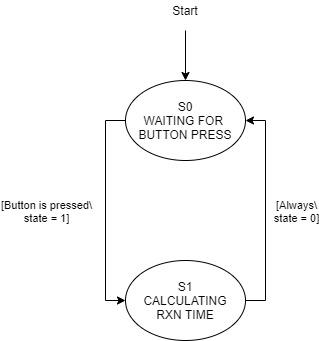
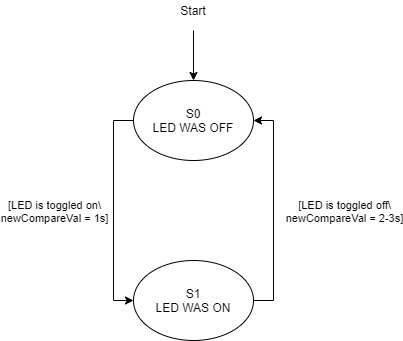
Using the Nucleo L476RG board, two timers will be configured in an Output Compare (OC) and Input Capture (IC) mode in order to measure the reaction time of a user pressing the B1 button when the LD2 LED turns on. The LED will be controlled with the OC timer, where it will be off for a random value between 2-3 seconds, turn on for exactly 1 second, and repear. The IC timer will be triggered when the B1 button is pressed on a falling edge. The difference in these two regions will be used to calculate a reaction time.
See source code here: https://bitbucket.org/ryanmclaug/matt_ryan_shared/src/master/405_Lab0x02/Lab0x02_B.py
| def Lab0x02_B.ICInterrupt | ( | tim2 | ) |
Callback function for the IC Interrupt.
The B1 button is hardwired to pin PB3, which is controlled by Timer 2, Channel 2. This is configured as an IC timer, with a polarity on the falling edge. When the button is pressed, the timerchannel.capture() feature is used to get the current count of the system.
| def Lab0x02_B.OCInterrupt | ( | tim2 | ) |
Callback function for the OC Interrupt.
Timer 2, Channel 1 is configured in an output compare method for timing the LED. The channel is configured with the OC_TOGGLE mode, where the pin for the LED is toggled on and off to control the light emitted. Within this callback, the compare value is reset to account for the next callback. This alternates between staying off for 2-3 seconds and staying on for exactly 1 second.
| int Lab0x02_B.lastCompareVal = 0 |
lastCompareVal holds the previous compare value for OC
The lastCompareVal is essentially the 'start' to the new LEd control. If the LED is initially off, the lastCompareVal stores the time that the LED switched from on to off. If the LED is on, lastCompareVal stores the count at which the LED turned on.
| int Lab0x02_B.newCompareVal = lastCompareVal + random.randrange(2000000,3000000) |
newCompareVal holds the future time to trigger the OC
The newCompareVal holds the count at which the OC interrupt will be triggered again. So, this value stores either the random 2-3 seconds where the LED is off, or the exact 1 second where the LED is on for.
| Lab0x02_B.pinA5 = pyb.Pin (pyb.Pin.board.PA5, mode = pyb.Pin.OUT_PP) |
Pin attribute for LED.
The A5 pin will be used to control the OC interrupt callback for the LED.
| Lab0x02_B.pinPB3 = pyb.Pin (pyb.Pin.cpu.B3) |
Pin hardwired to the B1 USER button.
The PB3 pin will be used in order to control the IC interrupt from an external press of the B1 USER button on the Nucleo.
| Lab0x02_B.t2ch1 = tim2.channel(1, pyb.Timer.OC_TOGGLE, pin=pinA5, polarity=tim2.HIGH, callback=OCInterrupt) |
Channel 1 attribute for pyb timer for OC interrupt.
Channel 1 of Timer 2 will be used for the OC control. The polarity of the A5 pin will be set to high.
| Lab0x02_B.t2ch2 = tim2.channel(2, pyb.Timer.IC, pin=pinPB3, polarity=tim2.FALLING, callback=ICInterrupt) |
Channel 2 attribute for pyb timer for IC interrupt.
Channel 2 of Timer 2 will be used for the IC control. The polarity of the PB3 will be set to a falling edge (the equivalent of the button being pressed instead of released).
| int Lab0x02_B.thisRxnTime = buttonPressCount - lastCompareVal |
The current reaction time for the run.
Calculate the reaction time in microseconds, which is convenient since the prescaler made the count equal to 1 microsecond.
| Lab0x02_B.tim2 = pyb.Timer(2, period = 0x7fffffff, prescaler = 79) |
32-bit timer used to control the IC and OC interrupts.
Timer 2 will be used for its 32-bit counter for high definition with a period of 0x7FFFFFF and prescaler = 79. By using those period and prescaler values, the timer will take over 35 minutes before overflow (thus virtually eliminating any overflow errors). The prescaler, with a frequency of 80 MHz, will allow for a count to equal 1 microsecond, a convenient measurement.
 1.9.2
1.9.2